How to Open .max Files in Cinema 4D
Drag the .max onto Cinema 4D. That is the whole method.
Cinema 4D ships no .max importer. MAX2C4D gives it one — the scene comes back with its Corona, V-Ray and Redshift materials, lights and cameras. No 3ds Max, no FBX, no rebuild.
- Step 1
Drop it
Drag the .max onto Cinema 4D. File > Open and File > Merge work too, and ZIP archives are listed without extracting so you pick the scene you want.
- Step 2
It reads the file
MAX2C4D decodes the .max container itself, inside Cinema 4D. No export step, nothing to prepare, no 3ds Max anywhere in the chain.
- Step 3
The scene is back
Materials rebuilt node-by-node as native Corona, V-Ray or Redshift shaders. Multi/Sub-Object becomes Selection Tags, lights, cameras and render settings included.
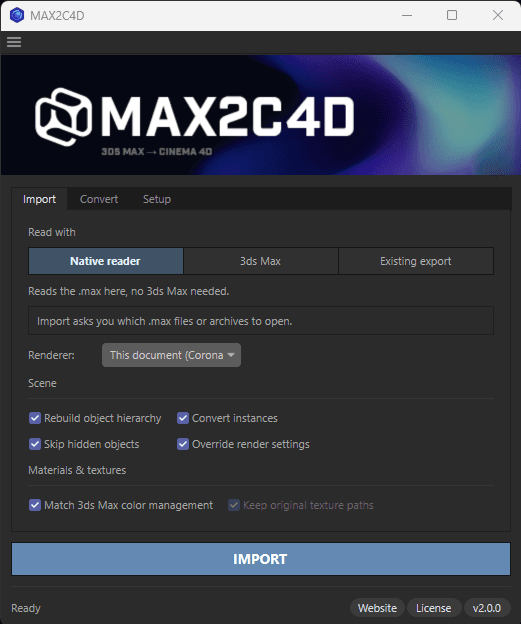
Or open the dialog, if you want the controls
Same import, with the options exposed — Extensions → MAX2C4D Import in Cinema 4D.
- ·Pick the target engine — Corona, V-Ray or Redshift — or let it follow the Max scene.
- ·Browse a ZIP without extracting it and choose which scene to open. RAR works the same way on Windows.
- ·Queue a whole folder: a file that cannot be read is named and skipped instead of taking the batch down with it.
- ·Every control, in order: the interface guide.
No — Cinema 4D cannot open .max files on its own. The format is proprietary to Autodesk 3ds Max. With MAX2C4D installed it can: the plugin registers .max as a file type and decodes the format itself, inside Cinema 4D. Requirements in full: Cinema 4D 2024 or newer, and a licence. That is the list.
Same scene, before and after the drop
Left: the original, rendered in 3ds Max. Right: Cinema 4D, straight after the file was dropped in — nothing rebuilt by hand. Drag the handle.


Open your own .max the same way.
Works on Cinema 4D 2024–2026, Windows and Apple Silicon, with files saved by 3ds Max 2020–2026. You do not need 3ds Max, Corona or V-Ray installed to read the file.
The rest of this guide: the two other routes and what they cost you, why the format is closed, what exactly transfers, macOS, and the two things that still need 3ds Max.
The Other Two Ways In — and What They Cost You
You can still get a .max into Cinema 4D without the plugin. Both routes work. Both charge you for it — one in hours, the other in hours and money.
Drag and drop (MAX2C4D)
Native Corona, V-Ray & Redshift shaders, node-by-node, batch-ready
FBX Export
Costs you time — every Corona, V-Ray and Redshift material is stripped on the way out
Free converters
Costs you time and money — partial materials, no Redshift, no node graphs, often abandoned
Route 2: export to FBX from 3ds Max
Costs you 4-8h per sceneOpen the .max in 3ds Max, export to FBX, import in Cinema 4D. It needs a 3ds Max licence you may not have, and FBX was never designed to carry renderer-specific material graphs. The geometry survives. Nothing else does.
What you get
- ·Geometry & meshes
- ·Object hierarchy
- ·Bones & animation keyframes
What you lose
- ×All Corona, V-Ray & Redshift materials
- ×Node graph connections (flattened)
- ×Multi/Sub-Object assignments
- ×Render settings & tone mapping
- ×Texture paths (UNC, NAS, cloud)
- ×Corona/V-Ray/Redshift lights, IES, cameras
What lands in Cinema 4D is gray, untextured geometry and an empty material editor. Then 4 to 8 hours of manual rebuilding per scene, copying every CoronaBitmap and every Multi/Sub-Object assignment by hand from screenshots of the original. On a 30-scene project that is 120 to 240 billable hours before any creative work starts. Full breakdown: MAX2C4D vs FBX and why rebuilding by hand does not scale.
Route 3: free converters and MaxToC4D
Costs you time, then money anywayCommunity plugins and free converters — MaxToC4D being the most cited — handle basic geometry and simple Standard materials. Real archviz scenes break them: Corona and V-Ray materials are dropped or replaced with Standard, the ~130-parameter V-Ray render config does not cross over, Redshift is not a target at all, Multi/Sub-Object handling is inconsistent, UNC and NAS texture paths break, and many of these tools are side-projects frozen on one 3ds Max version years ago. You find out after the import, on the scene you needed today.
For a single 3dsky asset with Standard materials, free is enough. For client work that has to render the same on the C4D side, it is the difference between mostly works for geometry and ships tomorrow. Feature-by-feature: MaxToC4D alternative comparison.
Why .max Is a Closed Format
Autodesk owns the format, and it has no public specification.
A .max is not an interchange file like FBX or OBJ. It is a serialized snapshot of the entire 3ds Max runtime state in a single proprietary binary container — geometry, modifiers, materials, plugin data, render settings, animation controllers, the whole scene graph — and its internal structure changes between versions. That is why Corona materials (CoronaPhysicalMtl, CoronaBitmap, CoronaLayeredMtl and 20+ others), V-Ray materials (VRayMtl, VRayBlendMtl, VRayFastSSS2 and the full shading tree), render settings and plugin blobs such as ForestPack or Tyflow all sit in there in a shape Cinema 4D knows nothing about.
For years, every route into Cinema 4D therefore ran through 3ds Max itself. That is what changed: a .max is an OLE2 compound document whose scene graph names its own classes, so MAX2C4D can recognise a VRayMtl without V-Ray installed and read a Corona scene without Corona. The hard part is anything the file stores as a recipe rather than a result: an Edit Poly stack is a log of operations that has to be replayed, not read. MAX2C4D now replays most of it itself. What it cannot replay yet, ProBoolean included, is why two routes ship: the two things that still need 3ds Max.
For an exhaustive list of converters, exporters and asset bridges in the 3ds Max to C4D ecosystem, see all 3ds Max to C4D tools (2026).
What Transfers When You Open a .max File
Not just geometry — the full scene structure, including renderer-specific data no interchange format can carry.
Corona Renderer
- CoronaPhysicalMtl, CoronaLegacyMtl, CoronaLightMtl
- CoronaBitmap, CoronaColorCorrect, CoronaMixMtl
- CoronaLayeredMtl, CoronaRaySwitch, CoronaSelect
- CoronaNormal, CoronaTriplanar, CoronaAO
- CoronaSun, CoronaMoon, CoronaLight (all shapes)
- 20+ material and shader node types total
Deep dive: Corona materials guide
V-Ray Renderer
- VRayMtl, VRayBlendMtl, VRayFastSSS2, VRayLightMtl
- VRayBitmap, VRayColor, VRayColorCorrect
- VRayTriplanarTex, VRayNormalMap, VRayDirt
- VRayHDRI, VRayMultiSubTex, VRayMtlWrapper
- VRaySun, VRayLight, VRayIES, VRayDomeLight
- 15+ material types, ~130 render parameters
Deep dive: V-Ray lights & render settings
Scene data & render settings
- 200+ shader node types, full graph nesting
- Multi/Sub-Object → polygon Selection Tags
- Lights with IES profiles & colour temperature
- Physical cameras with depth of field
- GI solver, denoiser, progressive limits
- Tone mapping, LUT, environment overrides
Full list: Features
Extras
- ForestPack → Chaos Scatter
- Texture paths auto-resolved
- UNC & network paths supported
- Per-camera overrides
- VFB2 layers (V-Ray)
Type by type: what transfers
“The V-Ray graphs come through node-for-node. We stopped reshading purchased assets — the look matches the preview straight after import.”
Opening .max Files on Mac
3ds Max has never run on a Mac. That no longer matters.
MAX2C4D reads the .max on the Mac itself, natively on Apple Silicon — the same drag and drop, on the machine you already work on. On macOS the native reader is the only route in. Redshift ships with Cinema 4D and runs on Apple Silicon too, so a converted scene opens and renders without leaving the machine. If your scenes rely on VRayClipper or ForestPack, those still need the 3ds Max route — one Windows workstation can export for the whole Mac team. For studio-wide rollouts and licensing patterns, see the studio migration playbook.
On macOS the download is an installer package, signed and notarized by Apple: double-click it and the plugin is put into every compatible Cinema 4D on the machine. Quit Cinema 4D before installing, and launch it once beforehand so it has created its preferences — installation steps.
What Still Needs the 3ds Max Route
Two things. If your scenes lean on them, MAX2C4D can route the import through 3ds Max instead — one Max seat covers a whole team, since everyone else imports the folder it exports.
- VRayClipper
- ForestPack
Edit Poly stacks sit in between. The native reader replays them itself: chamfer, connect, inset, extrude, bevel, bridge, deleted and capped faces, welds. On our test corpus that covers 481 of the 541 edited objects. The rest, and ProBoolean, still need 3ds Max, which is why both routes ship and why the 3ds Max one remains the more complete of the two.
A .max saved with 3ds Max’s “Compress on save” option is encoded with a codec Cinema 4D does not ship, so it cannot be read natively at all — 5 of the 183 files in our test corpus. MAX2C4D names the option and gives you the two ways round it: re-save from 3ds Max with the box unticked, or import through the 3ds Max route.
The complete list, with each type’s status on each of the three engines, is on what transfers. The three read routes and when to use each are on how it works.
How MAX2C4D Knows It Read the File Right
Reading a .max wrong produces no error — just a reflection slightly too hard, or a glass a hundred times too dense, found at final render. So MAX2C4D checks itself: shipping both a native reader and a route through real 3ds Max means the same scene can go out both ways and be diffed automatically, value by value. The truth is never written by hand — 3ds Max supplies it.
Current result: 80,207 identical values, 0 divergent, across 37 scenes and 2,529 materials — 240 3ds Max classes decoded straight out of the binary and 2,914 named properties calibrated one at a time.
Drop the file. Get the scene.
Every Corona, V-Ray and Redshift node intact — without 3ds Max, without FBX, without rebuilding a single material.
Get MAX2C4D — $99Frequently Asked Questions
Explore the rest of MAX2C4D
Features
Every supported material, shader and renderer setting.
How it works
Step-by-step walkthrough of a real conversion.
vs FBX
Side-by-side breakdown of what FBX destroys.
vs Manual rebuild
Why one-by-one rebuilding never scales.
Showcase
Real archviz scenes converted by studios.
Scene Converter
Switch a C4D scene between render engines.
Batch exporter
Convert 40 .max files overnight, unattended.
Pricing
1-year license. All updates included. Money-back guarantee.
Related Guides
Convert 3ds Max Scenes to Cinema 4D
Full conversion guide — geometry, materials, lights, cameras and render settings.
Corona Materials in Cinema 4D
How every Corona material type and shader node transfers from 3ds Max.
V-Ray 3ds Max to Cinema 4D
Converting V-Ray materials, lights and ~130 render parameters cleanly.
Studio Migration Playbook
Rolling Max to C4D across an archviz studio without dropping deadlines.
Forest Pack to Chaos Scatter
How scatter density, slope limits and clusters map to Chaos Scatter.
3dsky / Evermotion Assets in C4D
How to use .max archviz asset libraries in Cinema 4D without losing materials.