Art Deco Apartment — 3ds Max to Cinema 4D, Zero Manual Tweaks
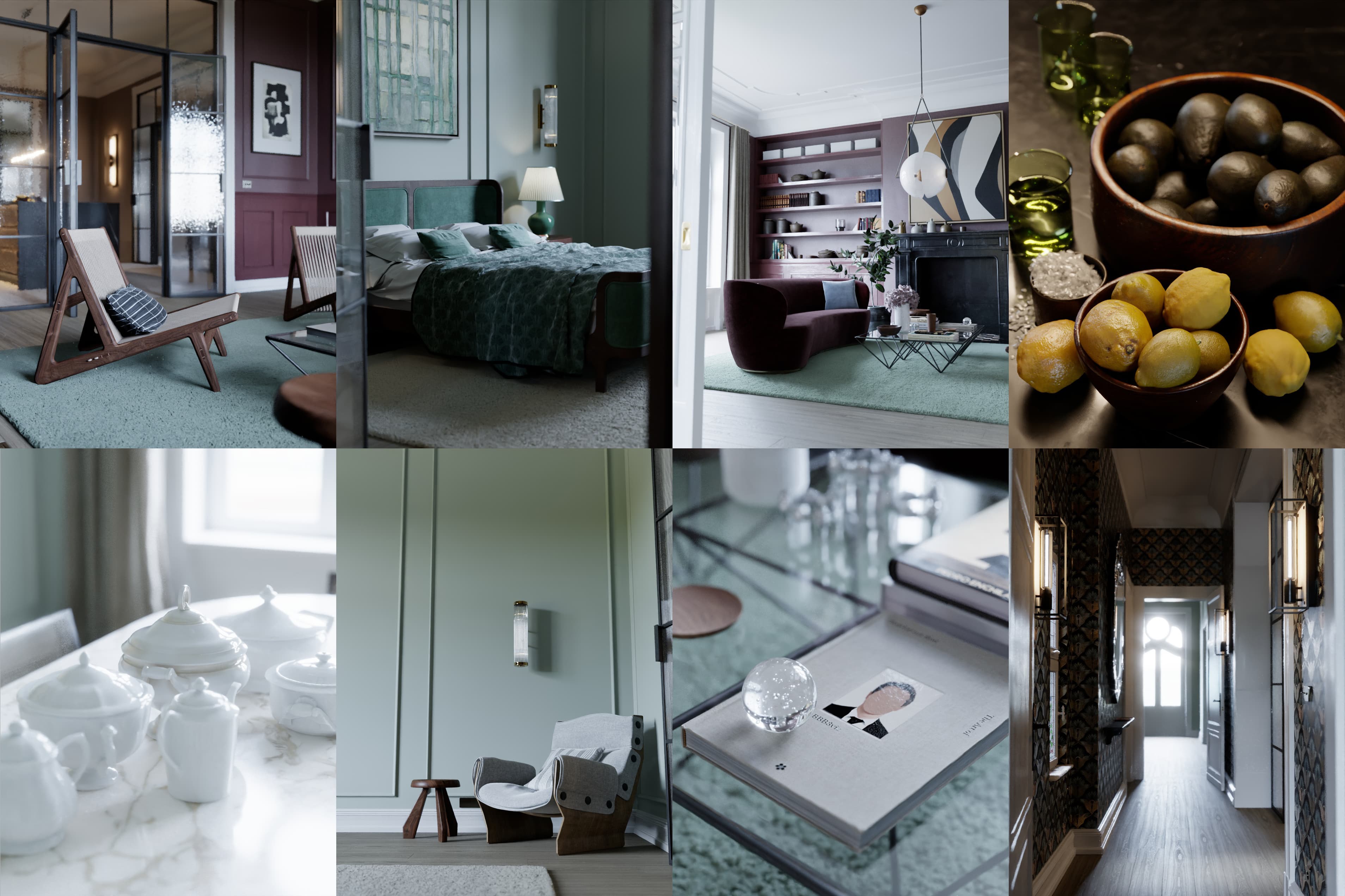
Scene by Bertrand Benoit. 772 objects, 197 Corona materials, mixed lighting, proxies, HDRI. Exported from Max, imported in C4D, rendered. No texture reassignment, no lights to reconfigure, no materials to redo by hand.
About This Scene
The Fully Furnished Art Deco Apartment is a production archviz scene created by Bertrand Benoit, one of the most recognized architectural visualization artists in the industry. Originally built in 3ds Max with Corona Renderer, this scene represents a realistic interior design project — not a simplified demo scene optimized to convert cleanly.
The apartment spans five distinct rooms — living room, dining room, kitchen, bedroom, and hallway — each with unique Corona materials, lighting setups, and furniture. The scene includes everything that makes archviz conversions difficult: dozens of CoronaPhysicalMtl materials with complex node graphs, Multi/Sub-Object assignments on furniture and architectural elements, CoronaSkinMtl for organic objects, CoronaHairMtl for carpet fibers, and CoronaLayeredMtl for aged book covers.
This is the kind of 3ds Max scene that would take 4 to 8 hours to rebuild manually in Cinema 4D — relinking 300 textures, recreating 197 materials from screenshots, repositioning 47 lights, and reconfiguring render settings. With MAX2C4D, the entire conversion takes 3 minutes and 14 seconds.
Why This Scene Is a Real Conversion Test
Most 3ds Max to Cinema 4D conversion tools fail on production archviz scenes because they rely on FBX, which strips all Corona-specific data. This scene stresses every part of the conversion pipeline:
Material complexity
197 materials mixing CoronaPhysicalMtl, CoronaLegacyMtl, CoronaSkinMtl, CoronaHairMtl, CoronaLightMtl, and CoronaLayeredMtl. Many use nested node chains — CoronaBitmap through ColorCorrect through CoronaMix into material slots. FBX loses all of this. MAX2C4D preserves the full shader graph.
Multi/Sub-Object everywhere
55 Multi/Sub-Object material swaps across furniture, doors, books, and architectural details. Each swap converts to polygon selection tags in Cinema 4D, maintaining per-face material assignments exactly like the original 3ds Max scene.
340 instances across 123 groups
Books, light fixtures, door handles, and repeating furniture are instanced in 3ds Max. MAX2C4D detects instance groups and recreates them as Cinema 4D instances, keeping file size manageable and edits synchronized.
Mixed lighting + HDRI
47 CoronaLights (rectangular panels, spheres) across five rooms, plus an HDRI environment with the UV offset automatically corrected for Cinema 4D's coordinate system. Light intensity, color temperature, shape, and visibility flags are all transferred.
The scene also includes 4 Chaos Scatter setups for vegetation and carpet, 78 Subdivision Surface modifiers handled during export, and 16 Corona cameras with DOF, exposure, and per-camera post-processing settings. Every element is converted automatically.
Room by Room
The apartment is organized into five rooms, each on its own 3ds Max layer. MAX2C4D preserves the layer hierarchy in Cinema 4D, so the scene structure remains navigable after import.
Living Room
Velvet sofa with CoronaHairMtl carpet, Chandigarh wicker chairs, glass coffee table, decorative books with CoronaLayeredMtl covers, wall sconces with CoronaLightMtl filaments. 8 sphere-shaped CoronaLights for ambient fill.
Kitchen
Brushed steel sink and appliances, cast iron fixtures, gas hob with Multi/Sub-Object burner materials, marble countertops, 26 rectangular CoronaLights for under-cabinet and ceiling lighting. CoronaMultiMap with 12 texture layers for parquet variation.
Dining Room
Marble fireplace with CoronaSkinMtl statue, old tile surround, large windows with correct glass IOR, art prints with Output curve color correction. Two cameras framing the fireplace and table.
Bedroom
Green velvet headboard, linen sheets with displacement, Ficus Elastica plant (Multi/Sub with bark and leaf materials), bedside lamps with translucent shades. 8 rectangular CoronaLights. 5 dedicated cameras.
Hallway
Art Deco tile patterns, doorframes with Multi/Sub-Object handle and plate materials, ribbed glass panels, 3 CoronaLights. The narrowest and most detail-dense area of the apartment.
Scene Breakdown
What Gets Translated Automatically
MAX2C4D is not a generic exporter. Every conversion has been calibrated to faithfully reproduce Corona rendering — gamma formulas, falloff curves, units, tiling modes, everything has been manually verified.
The Conversion Workflow — Export, Import, Render
Converting this 772-object archviz scene from 3ds Max to Cinema 4D followed the standard MAX2C4D workflow. No preparation was needed on the Max side — the scene was opened as-is from Bertrand Benoit's original .max file.
Export (165 seconds): This run used the 3ds Max route, with the MAX2C4D exporter running inside Max — geometry as OBJ at the time, materials and scene metadata as JSON, and all 300 textures collected into a local /tex subfolder. The exporter handled 78 Subdivision Surface modifiers, 55 Multi/Sub-Object material swaps, 75 non-ASCII object name renames, and 340 instance detections automatically.
Import (under 30 seconds): In Cinema 4D, the MAX2C4D plugin read the export folder and reconstructed the entire scene — 197 native Corona materials with full node graphs, 47 CoronaLights with correct shapes and intensities, 16 cameras with DOF and exposure, render settings including Corona GI solver and denoiser configuration, and 4 Chaos Scatter setups.
Render: Hit render. The images on this page are the result — no manual material adjustments, no texture relinking, no light repositioning. What you see is what MAX2C4D produced, straight from the automatic conversion.
These timings are from the original run and are left as measured. Two things have changed since: geometry now travels through Alembic on the 3ds Max route, which cut a 235 MB scene from 107 seconds to 24, and MAX2C4D can now open a .max directly inside Cinema 4D — see what transfers on each route.
Full Workflow Demo
Watch the complete export-import process from start to finish — from opening the .max file in 3ds Max to the final Corona render in Cinema 4D.
Try it on your own scene.
1-year license. 14-day money-back guarantee.
Get MAX2C4D — $99