Corona Materials in Cinema 4D — Complete Conversion Guide
Move every CoronaPhysicalMtl, every node, every connection from 3ds Max to Cinema 4D — node-by-node, drop-in for Corona for Cinema 4D.
Corona in 3ds Max vs Corona in Cinema 4D
Same renderer engine. Same material types. Different host application.
The good news
Corona for Cinema 4D is a native port of the same renderer you know from 3ds Max. Chaos Group develops both versions in parallel, and the material types are nearly identical: CoronaPhysicalMtl, CoronaBitmap, CoronaColorCorrect, CoronaMixMtl, CoronaLayeredMtl — they all exist in both versions with the same properties and the same rendering behavior.
The catch
The challenge isn't the renderer — it's getting the materials from one host application to the other. There is no built-in way to transfer Corona materials between 3ds Max and Cinema 4D. The .max file format is proprietary to Autodesk and, until MAX2C4D's native reader, could only be read by 3ds Max itself.
FBX export doesn't help either — FBX has no concept of Corona material types, so every CoronaPhysicalMtl, every CoronaBitmap, every node connection is stripped during export. Side-by-side breakdown: MAX2C4D vs FBX comparison.
Moving a Corona scene from 3ds Max to Cinema 4D has traditionally required rebuilding every material from scratch — referencing screenshots of the original Max scene, manually recreating node graphs, relinking bitmaps, and guessing parameter values. For a production scene with 200+ materials, this can take days. See the manual rebuild approach for the full ROI math, or the complete .max opening guide for the workflow. MAX2C4D eliminates that process by reading the Corona material data directly from the .max scene and rebuilding it as native Corona for C4D materials.
Which Corona Material Types Transfer
15 Corona material types. All preserved as native Corona for C4D.
MAX2C4D supports the full range of Corona material types. Every material is mapped to its exact Corona for C4D counterpart — not an approximation, not a fallback, but the same material type with the same properties.
CoronaPhysicalMtl
Base color, roughness, metalness, IOR, anisotropy, SSS, clearcoat, thin film, volumetrics, emission
CoronaLegacyMtl
Diffuse, reflect, refract, opacity, displacement
CoronaLayeredMtl
Multiple material layers with blending modes and masks
CoronaLightMtl
Emissive and self-illumination materials
CoronaHairMtl
Hair and fur shading with melanin and dye color
CoronaSkinMtl
Subsurface skin shading with scatter radius control
CoronaVolumeMtl
Volumetric absorption, scattering, and emission
CoronaToonMtl
Toon shading with outline and stylized coloring
CoronaFabricMtl
Fabric-specific BRDF for velvet, silk, and woven textiles
CoronaRaySwitcherMtl
Per-ray-type material switching for advanced compositing
CoronaDecalMtl
Projected decals with blending over base materials
CoronaSlicerMtl
Boolean-style geometry slicing with inner material
Multi/Sub-Object
Polygon Selection Tags per material ID — every face keeps its assignment
Standard Material
Legacy 3ds Max Standard materials with diffuse, specular, and bump
Physical Material
3ds Max Physical materials with PBR metalness/roughness workflow
All material types are converted with their complete property sets. CoronaPhysicalMtl alone carries base color, roughness, metalness, IOR, anisotropy, SSS, clearcoat, thin film, volumetrics, and emission — every one of these properties transfers to Cinema 4D. Full feature list: Features page. For the full scene workflow, see convert 3ds Max scenes.
Node Graph Preservation
Every node, every connection, every parameter — node-by-node.
This is the key differentiator. MAX2C4D doesn't approximate materials — it rebuilds the complete node graph. If a CoronaBitmap feeds into CoronaColorCorrect, which feeds into the roughness slot of a CoronaPhysicalMtl, that exact chain is recreated in Cinema 4D. Every connection, every parameter value, every bitmap with its tiling, offset, rotation, and gamma settings.
The importer walks each material's shader tree recursively. When it encounters a node, it creates the corresponding Corona for C4D shader, copies every property value, and wires it into the same slot on the parent node. The result is an identical node graph — same topology, same values, same visual result.
Real-world Corona materials are rarely simple. A typical archviz material chains a CoronaBitmap through CoronaColorCorrect for brightness adjustment, then through CoronaTriplanar for projection, then into a CoronaMixMtl that blends it with another material based on a CoronaAO mask. That entire chain — sometimes 5 to 10 nodes deep — transfers intact.
Supported Shader Nodes (80+)
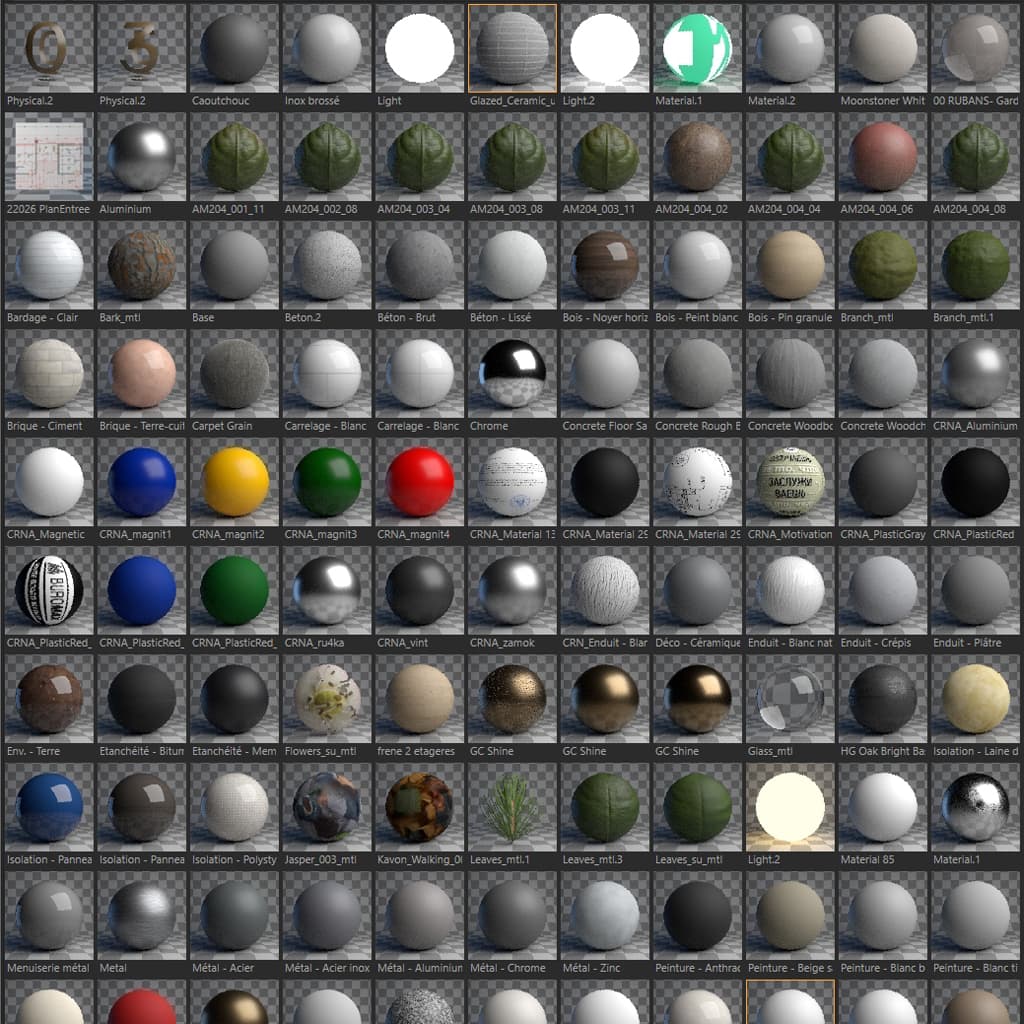
Corona materials panel in Cinema 4D after conversion
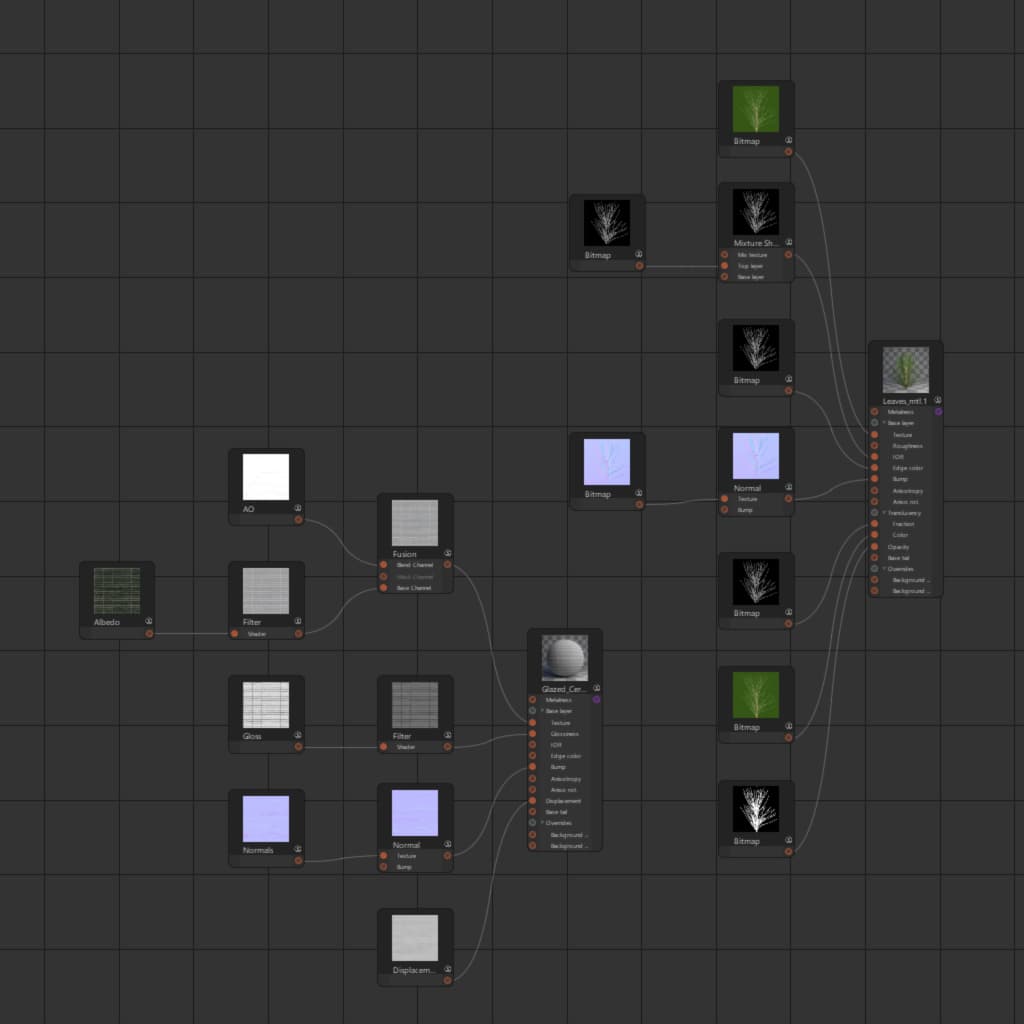
Node graph preserved — every connection intact
For a step-by-step walkthrough of the conversion process, see the How It Works tutorial. V-Ray pendant of this guide: V-Ray render settings.
Common Archviz Material Setups
Real-world Corona chains the way archviz pros build them.
These are real-world material configurations that appear in nearly every archviz project. Each one converts 1:1 from 3ds Max to Cinema 4D — same node structure, same parameter values, same render result.
Wood Floor
CoronaPhysicalMtl with a CoronaBitmap feeding the diffuse color through CoronaColorCorrect for tone adjustment and CoronaTriplanar for projection. Separate roughness map with inverted glossiness values. Normal map for surface detail. The full chain — bitmap, color correction, triplanar projection, and all three texture channels — transfers exactly as built.
CoronaBitmap → CoronaColorCorrect → CoronaTriplanar → CoronaPhysicalMtl (diffuse) + roughness map + normal map
Fabric Sofa
CoronaPhysicalMtl with CoronaBitmap for the diffuse texture, often combined with a CoronaFabricMtl layer for sheen and backlight behavior specific to woven textiles. Roughness is typically high (0.6-0.9) with subtle variation from a noise-based map. The fabric BRDF and all sheen parameters carry over directly.
CoronaBitmap → CoronaPhysicalMtl (diffuse) + CoronaFabricMtl (sheen layer)
Glass
CoronaPhysicalMtl with refraction enabled, thin mode for single-pane windows, and IOR set to 1.52 for architectural glass. Absorption color and distance control the tint. These are straightforward but critical parameters — a wrong IOR or missing thin mode changes the entire look. Both transfer with exact values.
CoronaPhysicalMtl (refraction: on, thin: on, IOR: 1.52, absorption color + distance)
Layered Paint
CoronaLayeredMtl with a base coat material on the bottom layer and a clearcoat CoronaPhysicalMtl on top. The clearcoat layer uses high IOR (1.5+), low roughness for glossy reflection, and a Fresnel-based blend mask. Both layers, their blending mode, and the mask texture transfer as a single CoronaLayeredMtl in Cinema 4D.
CoronaLayeredMtl → base coat (CoronaPhysicalMtl) + clearcoat (CoronaPhysicalMtl) with blend mask
See these exact setups rendered side-by-side in the Art Deco apartment benchmark — 772 objects, 197 materials, full Corona scene. ForestPack scatter objects present in real archviz scenes also map cleanly via the ForestPack to Chaos Scatter path.
“We stopped reshading purchased Corona scenes — the node graph just comes through. The look matches the preview straight after import.”
What About Non-Corona Shaders?
Standard Max shaders auto-convert. A few legacy procedurals don't.
Real-world 3ds Max scenes often mix Corona-specific shaders with built-in Max texture maps. Some have direct equivalents in Corona for C4D — others require creative mapping or fall outside conversion scope entirely.
Converted automatically
- Falloff → Mixture shader with Fresnel setup
- Color Correction → Corona Output / CoronaColorCorrect
- CompositeTexturemap → Corona Mix nodes with blend modes
- Bitmap → CoronaBitmap with full UV settings
- Mix → CoronaMix with amount or mask
- Output → CoronaColorCorrect with curve sampling
Not yet supported
- Cellular — 3ds Max procedural noise texture
- Noise — 3ds Max built-in noise generator
- Wood — 3ds Max procedural wood grain
- Marble — 3ds Max procedural marble veins
Unsupported shaders are logged in the conversion report for manual attention. In practice, most archviz scenes use bitmap textures rather than procedural maps, so these rarely appear. If you're evaluating other tools, see the MaxToC4D alternative comparison or the broader 3ds Max → C4D tools ecosystem.
Before & After: Corona Interior Scene
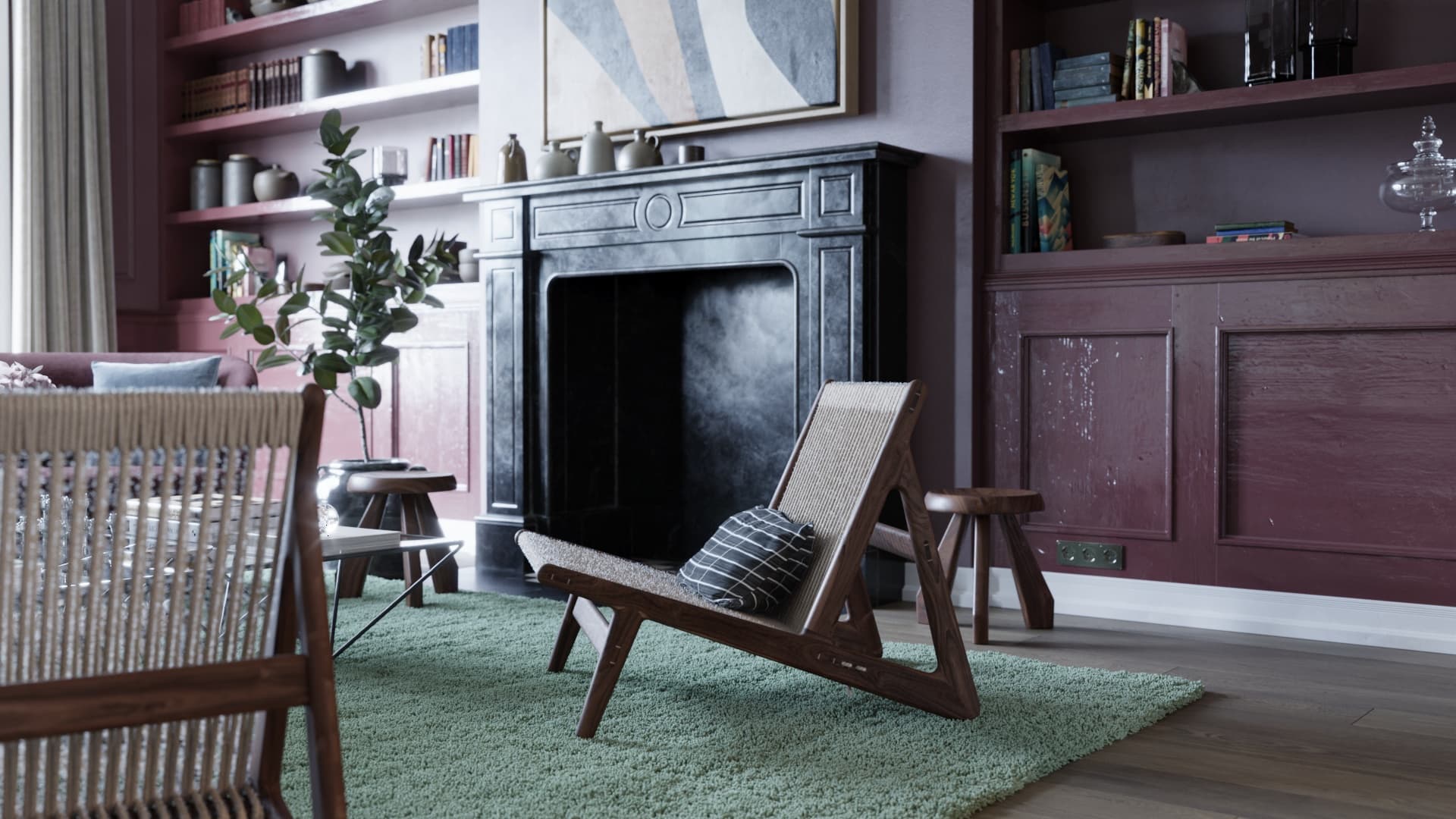
3ds Max (Original)
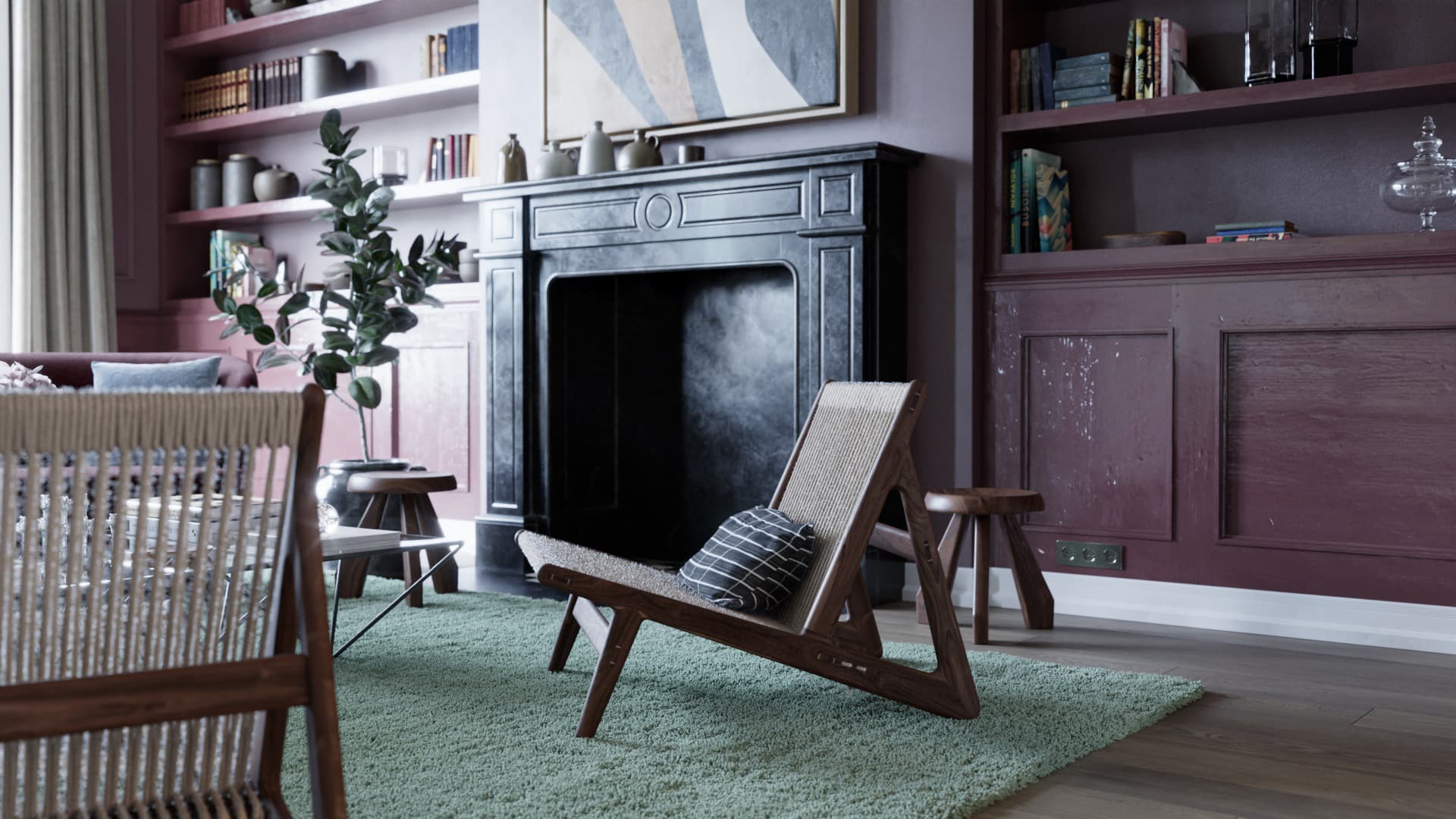
Cinema 4D (via MAX2C4D)
Same scene, same materials, same lighting. The Cinema 4D render uses exclusively the converted Corona materials — no manual adjustments after import.
Beyond Materials: Lights, Cameras and Render Settings
The materials are only part of a Corona scene. The rest of it comes across too, rebuilt as native Corona for C4D objects.
Corona Lights
All types: Rect, Disc, Sphere, Cylinder. IES profiles, CoronaSun, CoronaMoon, physical parameters.
Render Settings
GI solver, denoiser, tone mapping, LUT, caustics, environment overrides — your full render config.
Corona Proxy (.cgeo)
Proxy file references with path resolution. Your proxy library works in C4D as-is.
Physical Cameras
Full exposure (f-stop, shutter, ISO), DOF, bloom, glare, per-camera overrides.
MAX2C4D converts V-Ray materials directly to Corona for C4D equivalents — VRayMtl → CoronaPhysicalMtl, VRayLight → CoronaLight, VRayBitmap → CoronaBitmap. Set the renderer dropdown to "Corona". Useful for studios standardizing on Corona.
Explore the rest of MAX2C4D
Features
Every supported material, shader and renderer setting.
How it works
Step-by-step walkthrough of a real conversion.
vs FBX
Side-by-side breakdown of what FBX destroys.
vs Manual rebuild
Why one-by-one rebuilding never scales.
Showcase
Real Corona archviz scenes converted by studios.
What transfers
The full compatibility matrix, class by class.
Batch exporter
Convert 100+ Corona scenes overnight, unattended.
Pricing
1-year license. All updates included. Money-back guarantee.
Frequently Asked Questions
Keep your Corona materials. Every node. Every chain.
15 material types. 80+ shader nodes. 43 seconds for 847 objects.