The scene you already have open. Rendered by another engine.
No .max file and no re-import. Open your Corona project, pick Redshift, and the scene is rebuilt in place — materials, lights, cameras, render settings, environment, proxies and scatters. The document renderer is switched over with them, so you can hit render straight away.


One document, one dropdown. Nothing was re-imported and no .max was involved — the same Cinema 4D scene, before and after the Convert tab ran.
Corona and V-Ray, into any of the three
The engine you convert to can be any of the three — MAX2C4D already knew how to write all three from the .max side, and the converter reuses those same builders. The engine you convert from is where the work was: reading a finished Cinema 4D document back into a neutral form takes a table per engine, and there are two of them today.
A whole scene, not just its materials
A converted scene that keeps its materials and loses everything that lit them renders black. All seven domains cross on both readable sources, in a fixed order imposed by what references what — the sky needs its sun before it can be rebuilt, and proxies need their materials.
Materials
Rebuilt on the target engine, values and whole texture trees. The material is swapped by pointer, so your texture tags — polygon selection, projection, offset, tiling — are left exactly as you set them by hand
Lights
Area lights and the sun, with their shape, size, colour, intensity in the target engine’s own unit, IES profile and sun angle. They stay in the group and at the spot where you put them
Cameras
ISO, shutter, f-stop, depth of field and its aperture shape, per-camera bloom and sharpening. The camera object is never replaced, only its engine tag, so name, position and animation tracks survive
Render settings
Exposure, tone mapping, bloom and sharpening. On Redshift the tone mapping lives on the camera rather than in the render settings, and it is carried there for you
Environment
A physical sky or an HDRI environment is rebuilt as a V-Ray Environment, a Dome Light or a Redshift Sun and Sky, so a converted exterior keeps the light that comes from everywhere
Proxies
Baked into real geometry, in place, with their sub-materials and their name. No target engine can read a .cgeo or a .vrmesh, so the cache has to become mesh on the way across
Scatters
Chaos Scatter is a Chaos product rather than an engine object, so it is kept as it is — and its distribution surfaces are re-pointed at the baked geometry, so nothing ends up scattering on an object that no longer exists
Chaos Scatter renders under Corona and V-Ray but not under Redshift: it instances engine-side, so nothing of it reaches the render. It is left in place and named in the Console — its models are real geometry after the conversion, so they can be re-scattered with a Redshift-friendly cloner.
The tab tells you what it can read
Modelled on Corona's own scene converter: what will not cross should be readable before you commit, not discovered afterwards. The Convert tab reads your document as soon as you switch to it and gives you the count.
It names your engine, not ours
This scene renders with Corona. Read from the document’s own render settings, and recalculated whenever you switch document — the tab follows the scene you are working in rather than the one that was open when the window opened
It counts before it converts
What the converter can read is given as two numbers rather than one: how many are readable, out of how many are there. One number on its own always reads as a success
The button is never greyed in silence
Every path that disables CONVERT SCENE writes the reason on the line underneath, in terms of what your scene will become rather than what our code has not written yet
Engines you do not have are visible, not offered
An engine missing from this machine stays in the Convert to menu marked (not installed), so you can see it is supported and cannot pick it by accident
Read from the document, rebuilt on the target
Twenty-six material classes across the two readable engines, each read back into a neutral form and rebuilt by the same builders the .max import uses. Whatever has no counterpart on the target engine is named in the Console with its value.
Corona
material classes read15
- CoronaPhysicalMtl
- CoronaLegacyMtl
- CoronaLayeredMtl
- CoronaLightMtl
- CoronaSkinMtl
- CoronaHairMtl
- CoronaVolumeMtl
- CoronaToonMtl
- CoronaFabricMtl
- CoronaScannedMtl
- CoronaShadowCatcherMtl
- CoronaRaySwitchMtl
- CoronaSelectMtl
- CoronaSlicerMtl
- CoronaOutlineMtl
V-Ray
material classes read11
- VRayMtl
- VRayBlendMtl
- VRayLightMtl
- VRay2SidedMtl
- VRayFastSSS2
- VRayHairNextMtl
- VRayCarPaintMtl
- VRayFlakesMtl
- VRayToonMtl
- VRayBumpMtl
- VRayOverrideMtl
Switched-off sections stay behind
Corona keeps a value inside a section even when that section is off, and ten of its twelve sections sit at full strength while off. Redshift and V-Ray have no such switch, so copying those values across turned a wooden table into glass under a full clear coat. They are left behind now, and counted in the Console.
Worn floors, painted metal, a book cover
The most worked-on materials in an archviz scene are the layered ones, and they were the last to cross. A Corona Layered or a V-Ray Blend is now rebuilt on the target engine whole, and the duplicate layers it used to leave behind in the material manager are cleaned up.
- CoronaLayeredMtl and VRayBlendMtl, both directions
- The base material, every layer, and each layer’s own material
- Layer masks, and a mask you switched off stays off
- Blend amounts, including a layer dosed at 37% with no mask
- A layer switched off arrives switched off
- A blend inside a blend arrives nested, not flattened
Whole trees, not just the bitmap at the end
A wooden table used to arrive the right colour but flat. Bitmaps cross with their tiling, offset, rotation, UV channel and gamma, and so does everything stacked on top of them, read down through every level.
Corona nodes
read down through every level18
- CoronaBitmap
- CoronaColorCorrect
- CoronaMix
- CoronaNormal
- CoronaAO
- CoronaCurvature
- CoronaTriplanar
- CoronaTileMap
- CoronaMultiMap
- CoronaDistance
- CoronaRoundEdges
- CoronaFrontBack
- CoronaEdgeMap
- CoronaRaySwitch
- CoronaSelect
- CoronaData
- CoronaTonemapControl
- CoronaUVWRandomizer
V-Ray nodes
read down through every level27
- VRayBitmap
- VRayNormalMap
- VRayDirt
- VRayCompTex
- VRayTriplanarTex
- VRayEdgesTex
- VRayCurvature
- VRayMultiSubTex
- VRayDistanceTex
- VRayRaySwitch
- VRayUVWRandomizer
- VRay2SidedTex
- VRaySoftbox
- VRayUserColor
- VRayUserScalar
- VRayOCIO
- VRaySamplerInfoTex
- VRayHairInfoTex
- VRayParticleTex
- VRayOSLTex
- VRaySky
- Color_Correction
- Gradient_Ramp
- CompositeTexturemap
- Cellular
- Noise
- Mix
Cinema 4D's own
native shaders mixed into engine trees8
- Noise
- Cellular
- Checkerboard
- Gradient
- Layer
- Colorizer
- Fresnel
- Vertex Map
A scene built in Cinema 4D mixes native shaders into engine trees freely, so the converter reads those too. Layer order, blend modes and layer opacity all survive; a composite used to take its whole stack down with it.
What does not convert yet
Six compound material forms have no conversion written for them. They are reported in the Console and left untouched in your scene rather than replaced by something approximate, so nothing is lost while they wait.
- Multi/Sub-Object
- Select
- RaySwitch
- Outline
- Slicer
- 2-Sided
Two more things worth knowing
Baking a proxy reads its cache through the source engine's Cinema 4D plugin, so converting a Corona scene full of .cgeo proxies needs Corona for Cinema 4D installed even though you are leaving Corona. And a proxy whose cache file is missing is kept as a proxy rather than destroyed — the Console tells you the cache is what is missing, so the one object whose path you can still fix is still there.
A tab in the window you already use
Import and Convert are two tabs of equal standing in the MAX2C4D window, each with its own settings and a single button underneath that reads IMPORT or CONVERT SCENE depending on which tab you are on. There is no second plugin to find and no second menu entry: it is the same subject, so it is in the same place.
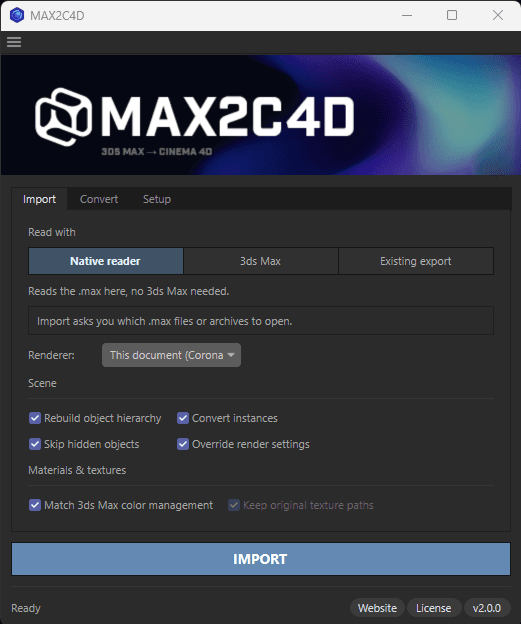
Included in the MAX2C4D license, at no extra cost — the same 1-year license that covers the .max import and the batch exporter. All 4 of the routes above work on Windows and on Apple Silicon.
Stop rebuilding your
entire scene by hand.
Every hour you spend rebuilding materials, relinking textures, and reconfiguring lights and render settings is an hour you're not rendering, not iterating, not billing. MAX2C4D pays for itself on the first scene.
1-year license — not a subscription. Nothing renews automatically.